Preparing for Audits Using Built-In EHR Compliance Tools

EHR Compliance Tools for Audit-Ready Practices

Why Audit Preparedness Matters More Than Ever in 2026

Healthcare audits are no longer rare events reserved for large hospital systems. Today, practices of every size, solo providers, small clinics, and multi-specialty groups are subject to scrutiny from the Office for Civil Rights (OCR), the Office of Inspector General (OIG), and the Centers for Medicare & Medicaid Services (CMS).
The numbers speak for themselves:
  • The average cost of a healthcare data breach is now $7.42 million, according to IBM’s 2025 Cost of a Data Breach Report.
  • In recent years, 55% of OCR financial penalties were levied against small medical practices.
  • In 2026, new CMS interoperability rules and updated HIPAA Security Rule requirements have raised the compliance bar significantly.
For most practices, the biggest challenge isn’t a lack of willingness to comply; it’s a lack of visibility. Without the right tools built directly into your Electronic Health Record (EHR) system, staying audit-ready becomes a manual, time-consuming, and error-prone process.
That’s exactly where built-in EHR compliance tools change the game.

What Auditors Actually Look For in Your EHR

Whether it’s a routine regulatory review or a targeted investigation, auditors follow a predictable checklist when examining your EHR system. Understanding what they’re looking for is the first step to being ready.
Audit Focus Area What Auditors Examine
Audit Logs
Who accessed patient records, when, and from where
Access Controls
Role-based permissions and user authentication
PHI Handling
Encryption of protected health information at rest and in transit
Meaningful Use
Evidence that the EHR was used as required under the ONC certification
Documentation Integrity
Accuracy, completeness, and timestamps on clinical notes
Security Risk Analysis
Documented, up-to-date risk assessments
Patient Portal Activity
Whether patients have functional access to their records
Incident Response Records
Documentation of any breaches and how they were handled
Auditors are increasingly looking not just at whether safeguards exist, but whether they are actively monitored and documented. An EHR that logs everything but never reviews those logs is still a compliance liability.
Key Built-In EHR Compliance Tools That Keep You Audit-Ready

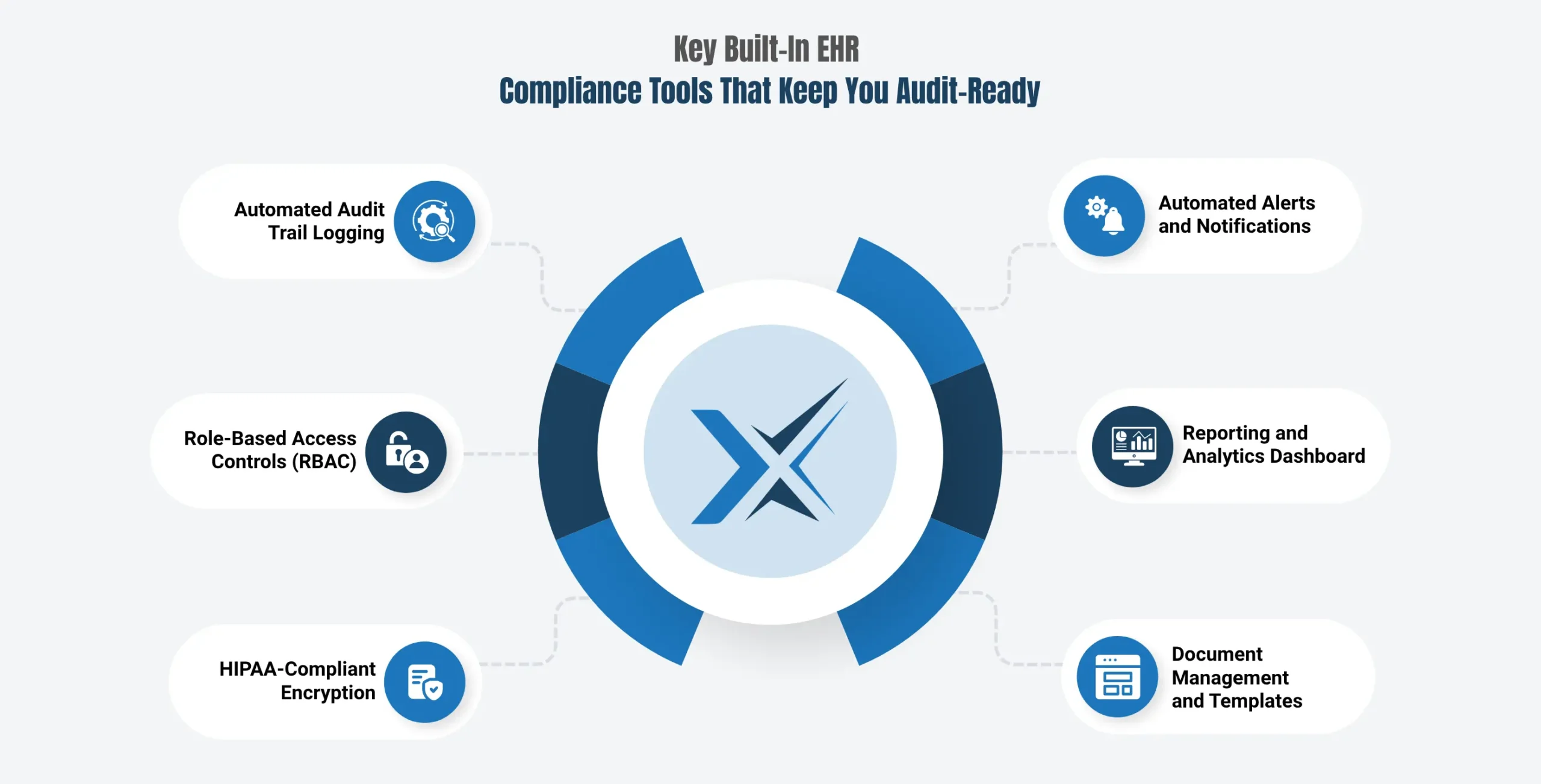
Key Built-In EHR Compliance Tools That Keep You Audit-Ready

Modern EHR platforms like Maximus EHR are built with compliance infrastructure embedded at the core. Here are the essential built-in tools every audit-ready EHR should provide:

Automated Audit Trail Logging

Every action taken within your EHR, record access, edits, deletions, and logins are automatically logged with:

  • User ID and role
  • Date and timestamp
  • The specific record accessed or modified
  • The device or location used

Role-Based Access Controls (RBAC)

RBAC ensures that each team member can only access the minimum amount of patient data necessary for their role. This limits exposure of Protected Health Information (PHI) and reduces suspicious activity in your logs.Every action taken within your EHR, record access, edits, deletions, and logins are automatically logged with:

HIPAA-Compliant Encryption

Patient data must be encrypted both at rest and in transit. A compliant EHR handles this automatically, meeting the 2026 HIPAA Security Rule encryption requirements without requiring manual configuration by your team.

Automated Alerts and Notifications

Built-in alerting flags suspicious activity such as:
  • Failed login attempts
  • Off-hours record access
  • Mass data lookups
  • Unauthorized PHI transfers

Reporting and Analytics Dashboard

Real-time dashboards give practice administrators a live view of compliance status, outstanding tasks, and potential risk areas, before an auditor does.

Document Management and Templates

Structured, standardized documentation templates reduce inconsistencies in clinical notes, which are a frequent source of audit findings.

How Audit Trails Work in a Compliant EHR System

An EHR audit trail is the chronological, tamper-evident record of every action taken within the system. It is your primary proof of accountability during any regulatory review.
A complete audit trail captures:
Maximus EHR generates audit logs automatically, stores them securely, and makes them exportable on demand, so you can respond to any auditor request quickly and completely.

Common EHR Compliance Gaps That Trigger Audits

Most compliance failures aren’t caused by bad intent. They result from gaps in systems and habits that build up over time. Here are the most frequently cited issues in OCR investigations and audit findings:
Compliance Gap Risk Level Common Cause
No documented Security Risk Analysis (SRA)
🔴 High
Skipped during onboarding or annual review
Shared login credentials among staff
🔴 High
Convenience over protocol
Audit logs have never been reviewed
🟡 Medium
Logging is enabled, but no review process is in place
Inactive or unusable patient portal
🟡 Medium
Set up but not maintained
Excessive access permissions
🟡 Medium
RBAC is not properly configured
Missing Business Associate Agreements (BAAs)
🔴 High
Vendor onboarding oversight
No automatic session logoff
🟢 Lower
Default settings not adjusted
Unencrypted data exports
🔴 High
Manual processes bypassing system controls
The good news: most of these gaps are fixable with the right EHR platform and consistent usage habits. Maximus EHR’s built-in compliance infrastructure addresses the majority of these issues at the system level.
Step-by-Step Using Maximus EHR to Prepare for an Audit

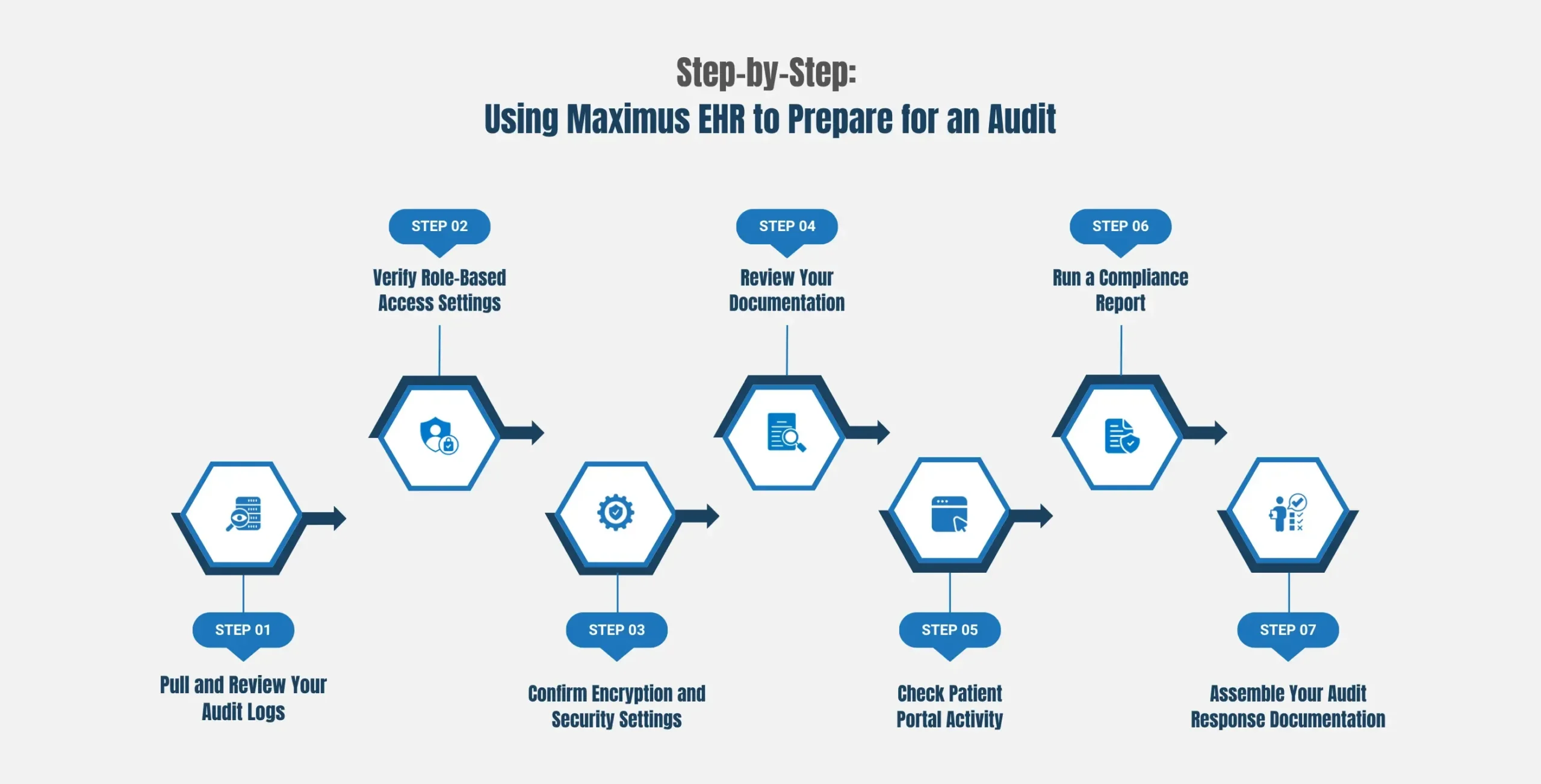
Step-by-Step: Using Maximus EHR to Prepare for an Audit

Whether an audit is scheduled or unexpected, having a clear preparation process makes all the difference. Here’s how to use Maximus EHR’s built-in tools to get audit-ready:

Step 1: Pull and Review Your Audit Logs

Navigate to the audit trail section of your Maximus dashboard. Export logs for the relevant time period. Look for any unusual access patterns, off-hours activity, or unauthorized record views.

Step 2: Verify Role-Based Access Settings

Review each user’s access level. Confirm that permissions align with job responsibilities and that no staff member has access beyond what their role requires.

Step 3: Confirm Encryption and Security Settings

Verify that automatic session logoff is enabled, that all data exports are encrypted, and that MFA (multi-factor authentication) is active for all user accounts.Disconnected software systems often require paid integrations for:

Step 4: Review Your Documentation

Use Maximus EHR’s document management tools to confirm that:

  • Clinical notes are complete, timestamped, and consistent
  • All templates in use meet current documentation standards
  • No unsigned or incomplete notes remain in the system

Step 5: Check Patient Portal Activity

Ensure your patient portal is functional and actively used. Confirm patients have received access instructions and that the portal meets information-blocking compliance requirements under the 21st Century Cures Act.

Step 6: Run a Compliance Report

Use Maximus EHR’s advanced analytics and reporting tools to generate a compliance summary. This gives you a clear picture of where you stand and what, if anything, needs to be addressed before an audit.

Step 7: Assemble Your Audit Response Documentation

Compile your Security Risk Analysis, staff HIPAA training records, incident response plan, and Business Associate Agreements. Maximus EHR’s document management system keeps these organized and accessible.

The Cost of Non-Compliance vs. the Value of Audit-Ready EHR Tools

The financial and operational case for investing in a compliance-ready EHR is clear:
Factor Non-Compliant Practice Maximus EHR-Enabled Practice

Average breach cost

$7.42 million
Significantly reduced through proactive controls

HIPAA violation fines

$141 – $2.1 million per violation
Avoided through built-in safeguards

Audit preparation time

Days to weeks of manual effort
Hours, with automated log export and reporting

Staff time on compliance

High – manual tracking, spreadsheets
Low – automated workflows and dashboards

Regulatory risk exposure

High without active monitoring
Minimized through continuous audit trail logging
Research consistently shows that the cost of non-compliance is nearly three times the cost of maintaining compliance. Built-in EHR compliance tools are not just a regulatory checkbox; they are a financial safeguard for your practice.

Final Thoughts

Audit preparedness is no longer a once-a-year exercise. In 2026, with heightened OCR enforcement, updated HIPAA Security Rule requirements, and new CMS interoperability mandates, compliance must be woven into the daily fabric of how your practice operates.
The right EHR makes that possible, not by adding complexity, but by making compliance the natural byproduct of using the system every day.
Maximus EHR is built with compliance at its core. From automated audit trails and role-based access controls to real-time dashboards and HIPAA-compliant encryption, every tool you need to walk confidently into any audit is already in your system, ready to use.

Ready to see how Maximus EHR can make your practice audit-ready?

Discover how Maximus EHR simplifies compliance with automated logging, HIPAA-ready security tools, and exportable audit reports.

FAQs

What is an EHR audit trail, and why is it important?
An EHR audit trail is a secure, chronological record of every action taken within the system, including logins, patient record access, edits, deletions, and data transfers. It helps healthcare organizations demonstrate accountability, detect suspicious activity, and meet HIPAA compliance requirements during audits.
How does Maximus EHR help practices stay audit-ready?
Maximus EHR helps practices stay audit-ready through built-in compliance tools such as automated audit logging, role-based access controls, HIPAA-compliant encryption, compliance dashboards, automated alerts, and exportable audit reports that simplify regulatory reviews.
How long should healthcare practices retain audit logs?
Under HIPAA requirements, healthcare organizations should retain audit logs and related compliance documentation for at least six years. Logs should also be securely stored, tamper-proof, and reviewed regularly to identify unusual activity.
What are the most common EHR compliance mistakes that trigger audits?
Common compliance gaps include shared staff logins, incomplete security risk analyses, excessive user permissions, unreviewed audit logs, unencrypted data exports, and inactive patient portals. These issues can increase the risk of OCR investigations and HIPAA penalties.
Can small medical practices benefit from built-in EHR compliance tools?
Yes. Small and mid-sized practices are increasingly targeted for compliance reviews and often lack dedicated compliance teams. Built-in EHR compliance tools automate many security and monitoring tasks, reducing manual work while helping practices maintain HIPAA and CMS compliance standards.

Table of Contents

Maximus | Electronic Health Record

Transform Your
Practice with
AI-Powered EHR

Reduce administrative burden, streamline workflows, accelerate revenue, and deliver exceptional patient care.