Documentation Shortcuts That Save Providers Hours Each Week

Documentation Shortcuts That Save Providers Hours Each Week

Table of Contents

Introduction

For healthcare providers across the United States, documentation has become one of the most time-consuming aspects of patient care. What was once a necessary administrative task has evolved into a major contributor to physician burnout, reduced patient interaction time, and workflow inefficiencies.
Studies consistently show that providers spend hours each day on electronic health records (EHRs), often extending their work into evenings and weekends. This growing documentation burden not only affects provider well-being but also impacts the overall quality of care.
The good news? With the right documentation shortcuts and strategies, providers can reclaim valuable time each week, without compromising accuracy or compliance.

Why Documentation Takes So Much Time

Before diving into solutions, it’s important to understand why documentation is so time-intensive. Several factors contribute to this challenge. First, regulatory requirements demand detailed and structured patient records. Second, many EHR systems are not optimized for usability, leading to excessive clicking, repetitive data entry, and inefficient workflows. Lastly, providers often lack training in using advanced EHR features that could significantly reduce their workload.
Common documentation challenges include:
Addressing these issues requires a combination of practical shortcuts, better tools, and smarter workflows.
Top Documentation Shortcuts That Save Time

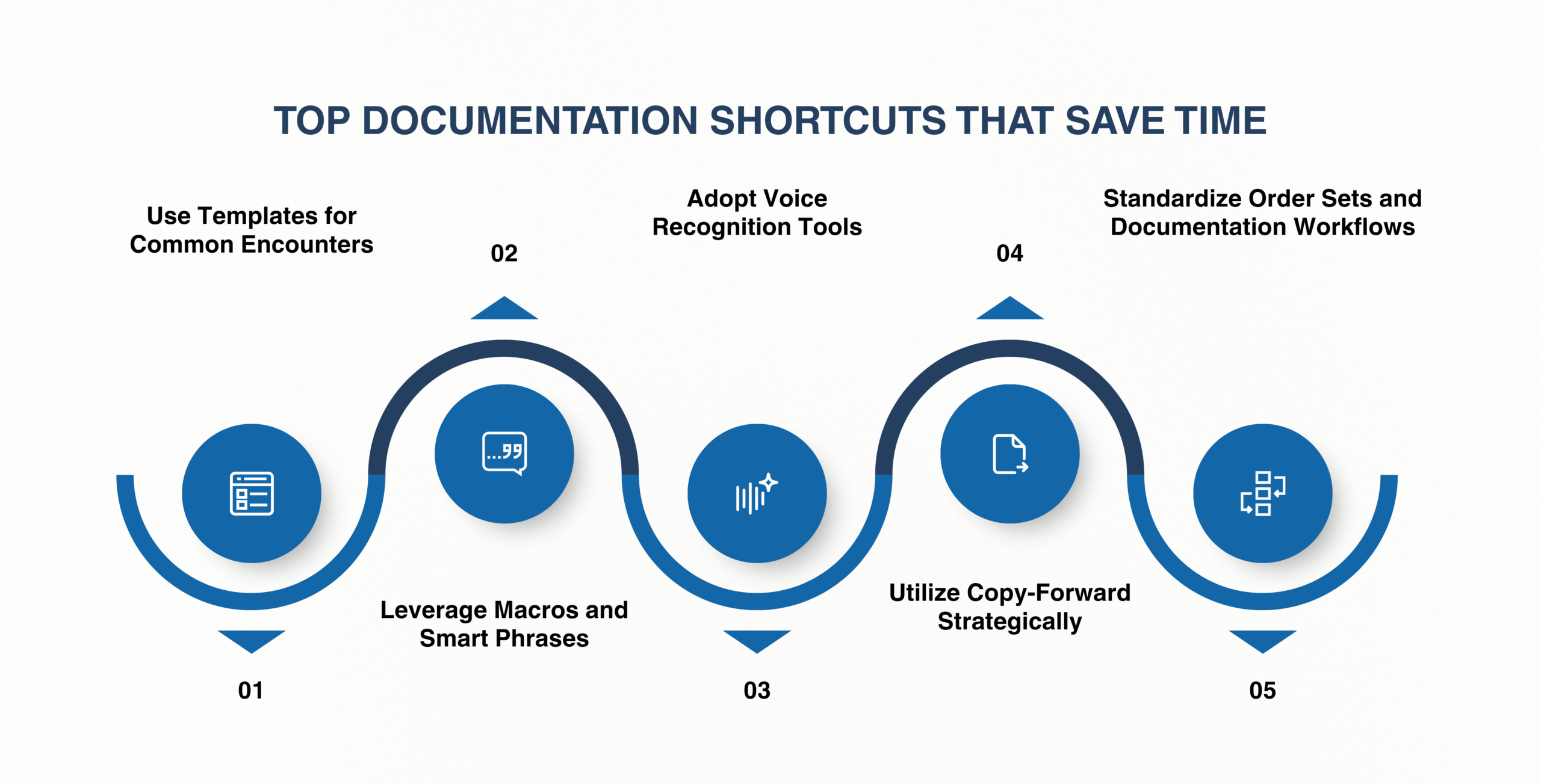
Top Documentation Shortcuts That Save Time

Implementing a few key shortcuts can dramatically improve documentation efficiency. These are simple yet powerful changes that providers can adopt immediately.
Use Templates for Common Encounters

Templates are one of the most effective ways to reduce documentation time. Instead of starting from scratch, providers can use pre-built formats for routine visits such as follow-ups, annual checkups, or chronic care management.

Benefits of templates:

Leverage Macros and Smart Phrases

Macros (or smart phrases) allow providers to insert frequently used text with just a few keystrokes. For example, typing a short code can automatically populate an entire paragraph.

Examples of use:
This not only speeds up documentation but also minimizes cognitive load during busy clinic hours.
Adopt Voice Recognition Tools
Voice dictation technology has significantly improved in recent years, making it a reliable option for clinical documentation.
Instead of typing, providers can dictate notes in real time, enabling faster, more natural documentation. This is particularly useful during patient encounters, where maintaining eye contact and engagement is essential.
Utilize Copy-Forward Strategically
Copy-forward functionality allows providers to reuse information from previous notes. While this must be used carefully to avoid outdated or incorrect data, it can save substantial time when used appropriately.
Best practices include:
Standardize Order Sets and Documentation Workflows
Creating standardized workflows for common conditions or procedures reduces variability and speeds up decision-making.
For example, having predefined order sets for conditions such as hypertension or diabetes ensures that providers don’t need to manually enter the same orders repeatedly.

Tools That Accelerate Documentation

Technology plays a crucial role in improving documentation efficiency. The right tools can automate repetitive tasks and streamline workflows.
Key Tools and Their Benefits
Tool Function Time-Saving Benefit
Templates
Pre-built documentation formats
Reduces typing time
Macros / Smart Phrases
Shortcut text insertion
Speeds up note creation
Voice Recognition
Dictation-based input
Enables real-time documentation
Clinical Decision Support
Automated suggestions
Reduces manual input
AI Documentation Assistants
Auto-generates notes
Minimizes documentation burden
These tools are most effective when integrated directly into the EHR system, allowing for seamless use during patient care.

Workflow Optimization Tips

Beyond individual shortcuts, optimizing overall workflows can lead to significant time savings.
Focus on Pre-Visit Preparation
Preparing patient charts before appointments can reduce documentation time during and after visits.
Key actions:
Delegate Non-Clinical Tasks
Whenever possible, administrative tasks should be delegated to support staff. This allows providers to focus on clinical decision-making rather than data entry.
Document in Real Time
Delaying documentation often leads to longer work hours and increased errors. Real-time documentation ensures accuracy and reduces the need for after-hours charting.
Minimize Click Fatigue
Excessive clicking is a major contributor to inefficiency. Optimizing EHR layouts and using shortcuts can significantly reduce unnecessary navigation.
The Role of Smart EHR Systems

The Role of Smart EHR Systems

While shortcuts and strategies can help, the biggest impact comes from using an EHR system designed for efficiency.
Traditional EHR systems often prioritize compliance over usability, resulting in complex interfaces and time-consuming workflows. In contrast, modern solutions focus on automation, intuitive design, and provider experience.
What to Look for in an Efficient EHR
Feature Impact on Documentation
Built-in Templates & Macros
Speeds up note creation
Voice Integration
Enables faster input
Automation Features
Reduces manual tasks
User-Friendly Interface
Minimizes navigation time
Customizable Workflows
Aligns with provider needs
This is where Maximus EHR stands out. Designed with providers in mind, Maximus EHR integrates advanced documentation shortcuts, automation tools, and intuitive workflows into a single platform. Instead of forcing providers to adapt to the system, it adapts to their needs, making documentation faster, easier, and more efficient.

Conclusion

Clinical documentation doesn’t have to be a time-consuming burden. By adopting the right shortcuts, such as templates, macros, and voice recognition, providers can significantly reduce the time spent on charting each week.
However, true efficiency comes from combining these strategies with a smart, user-friendly EHR system. When technology supports rather than hinders workflows, providers can focus on what truly matters: delivering high-quality patient care.
If your current system is slowing you down, it may be time to explore a better solution. Discover how Maximus EHR helps healthcare providers save hours every week with built-in documentation shortcuts, automation, and smarter workflows.

Save Hours on Documentation Every Week

Maximus EHR simplifies charting with smart templates, voice tools, and automation. Reduce burnout and boost productivity start your free trial today.

FAQs

What are the most effective EHR documentation shortcuts?
Templates, macros, and voice recognition are among the most effective shortcuts for reducing documentation time.
How can providers reduce charting time without compromising accuracy?
By using standardized templates, reviewing copy-forward content carefully, and documenting in real time.
Is voice dictation reliable for clinical documentation?
Yes, modern voice recognition tools are highly accurate and can significantly speed up documentation.
How do EHR systems impact provider productivity?
Efficient EHR systems streamline workflows, reduce manual tasks, and improve overall productivity.
Why is documentation a major cause of physician burnout?
Excessive time spent on administrative tasks, including documentation, reduces work-life balance and increases stress levels.